
Is there a real Airbnb « invoice » for the host ?
No, and that is the first source of confusion. As an owner, you do not receive a rental invoice. Airbnb provides three different documents, which are often mixed up.
- The VAT invoice: it covers the service fees charged by Airbnb, not your rental income.
- The earnings statement: monthly, yearly or custom, it details the money received.
- The annual statement and tax documents: they support your tax return, including the DAC7 reporting.
Understanding this distinction changes everything. The VAT invoice justifies an expense. The earnings statement justifies revenue. Both are useful, but for different purposes.
Where to find and download your Airbnb invoices and statements
Every function starts from the earnings dashboard, on a computer. Here are the verified paths to retrieve each document.
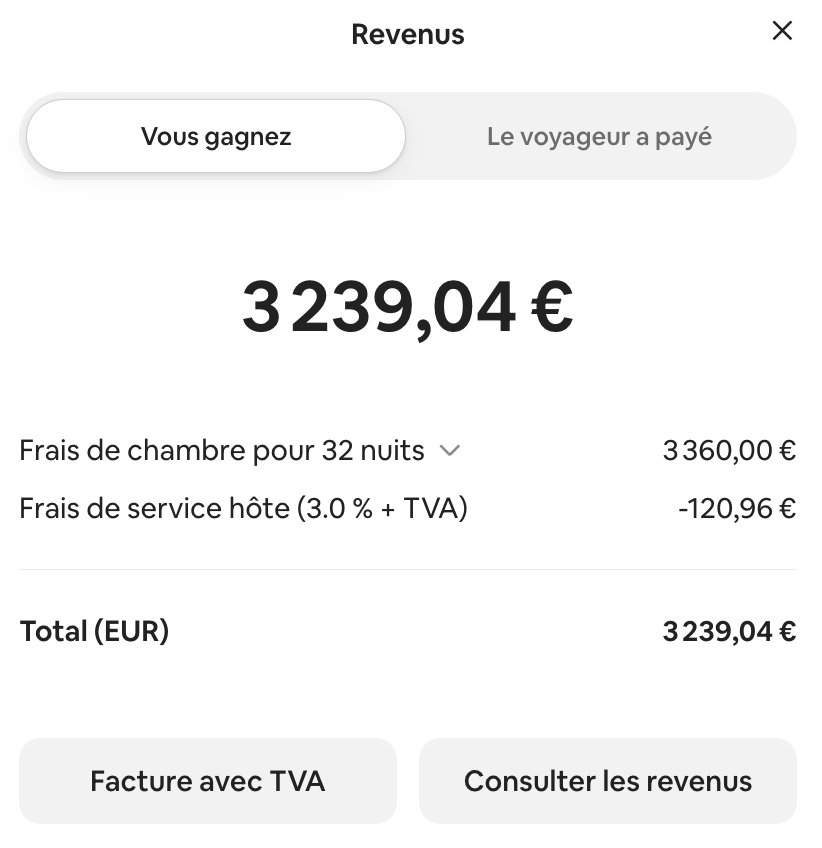
- VAT invoice for a reservation: go to Today, select the reservation, click the total price, then VAT invoice.
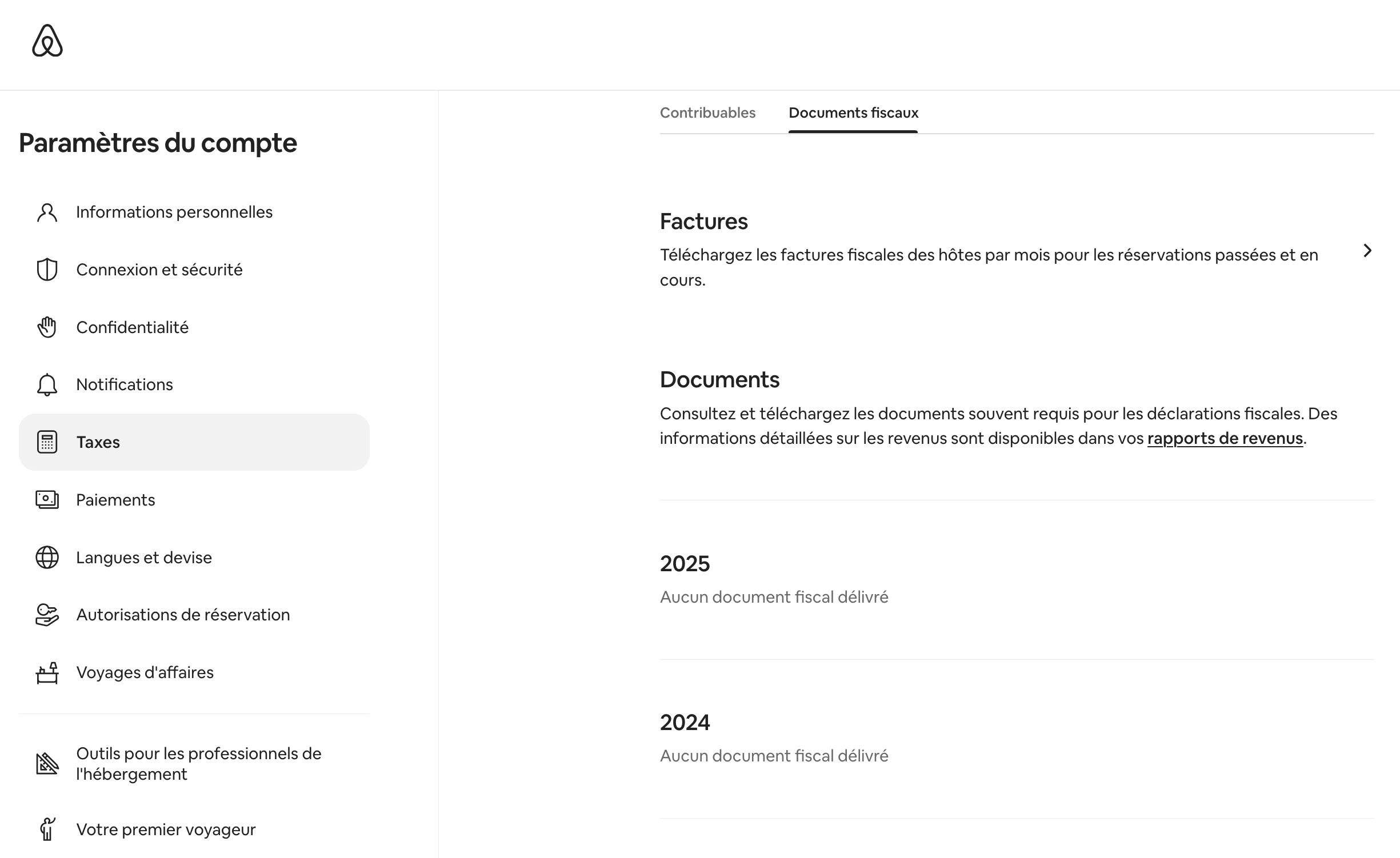
- Bulk download of invoices: Menu, Account settings, Taxes, Tax documents, Invoices. Choose the month, then the CSV or PDF format.
- Earnings report: Menu, Earnings, Earnings reports, View all reports. Open a monthly or yearly report, then Export to PDF.
- Accounting CSV export: in the Completed transactions tab, filter by listing and by dates, then click Get report.
Two limits to keep in mind. VAT invoices are only available for the last six months. Once issued, an invoice can no longer be modified.
Download your earnings reports every month, without waiting for year-end. You avoid the six-month limit on invoices. You also keep a reliable record, month by month, in case of an audit or a change of accountant.
What is your property's potential?
Get a free, no-commitment rental audit from our on-the-ground team.
What does an Airbnb service fee invoice contain ?
The VAT invoice shows the amount of service fees charged by Airbnb. It displays your host details registered in the account. It is issued as soon as the reservation is confirmed.
The fee rate depends on your account structure. Two models coexist in 2026.
| Structure | Host-side fee | Guest-side fee |
|---|---|---|
| Split fee | 3% of the subtotal | 14.1% to 16.5% |
| Host-only fee | Around 15.5% | None |
The « host-only fee » structure is mandatory in certain cases. It applies to hosts using management software and to traditional hospitality accommodations. Your net payout is calculated simply.
Net payout = gross revenue − host service fees − withheld taxes.
To read the details of a reservation, open the transaction in Completed transactions. The « Airbnb service fee » section shows the exact amount charged. To go further, see our method for calculating Airbnb service fees.
A question about your project?
Talk directly with your local Vesna agent. Available, responsive, no commitment.
The annual statement for your tax return
Every January, Airbnb sends an annual earnings statement to all its hosts. This document summarises your income from the previous year. It forms the basis of your tax return.

Your short-term furnished rental income falls under the BIC category. You report your gross earnings on the supplementary return no. 2042 C PRO. Two regimes exist: the micro-BIC or the actual regime (régime réel). To choose yours, follow our method to declare your Airbnb income.
Since 1 January 2023, the European DAC7 directive imposes an obligation on Airbnb. Every January, the platform reports your previous year's income to the tax authorities. Point of caution: if you do not provide your tax number, Airbnb freezes your payouts.
Your income is therefore already known to the tax office. A return consistent with the Airbnb statement is essential.
Delegate the tracking of your income
Finding, downloading and filing each document takes time. It is invisible but essential work. Would you like to delegate the management of your property on the Côte d’Azur ? Contact the Airbnb Concierge in Nice. We track your payouts and prepare your documents. You stay focused on what matters.
Would you like to delegate the management of your property on the Côte d’Azur ? Let's talk, with no commitment.
Frequently asked questions
- 1.Airbnb service fees — Airbnb Help Center, July 2026. airbnb.fr/help/article/1857
- 2.Download your Airbnb earnings — Airbnb Help Center, July 2026. airbnb.fr/help/article/3632
- 3.Find your Airbnb earnings for tax purposes — Airbnb Help Center, July 2026. airbnb.fr/help/article/416
- 4.Find your VAT invoice — Airbnb Help Center, July 2026. airbnb.fr/help/article/438
- 5.Tax data reporting (DAC7) — Airbnb Help Center, July 2026. airbnb.fr/help/article/3268
- 6.How to declare my income from the collaborative economy — impots.gouv.fr, 2026. impots.gouv.fr/particulier/questions/comment-declarer-mes-revenus-issus-de-leconomie-collaborative
Read also